Байконур Юбилейный / УАОН, даннные для PMDG FMC. Просмотр ZIP-архива
UAON_PMDG_Changes to data/UAON_PMDG_Changes to data.txt
PMDG Baykonur Yubileyny (UAON) Changes to data:

INSTALLATION:

1. Extract files from UAON_PMDG_Changes to data.zip.

2. Open file  wpNavAPT.txt, and add following to lines to the end of file, then save it.

BAYKONUR YUBILEYNY      UAON06 14763060 46.045000  63.218333110.7006000328
BAYKONUR YUBILEYNY      UAON24 14763240 46.060000  63.273000111.1024000328

2. Open  file  wpnavaid.txt, using Notepad or other text editor, and add following lines:

YUBILEYNY               BKN  VORD 46.065000  63.295000114.90H
KRAYNIY                 WM   NDB  45.628300  63.211566412.00N

3. Open  file  airports.dat, using Notepad or other text editor, and add following line:

UAON 46.053333  63.246666

*Recommended to add it under the line contains UAOO: overwrite airport.dat.


PMDG Yubileyny SIDS/STARS (unofficial):

4. Place file UAON.txt in to the folder: \PMDG\SIDSTARS.

Have a fun!

Ilya Khokhlov
[email protected]
37202-UAON-PMDG-Changes-to-data.zip
| Имя файла | Дата | Размер |
|---|---|---|
| UAON_PMDG_Changes to data/ | 02.04.2011 16:43 | |
| UAON_PMDG_Changes to data/UAON.txt | 02.04.2011 16:43 | 1 KB |
| UAON_PMDG_Changes to data/UAON_PMDG_Changes to data.txt | 02.04.2011 16:42 | 974 B |
| avsim_su.diz | 04.04.2011 06:18 | 406 B |
| Итого: | 3 KB | |
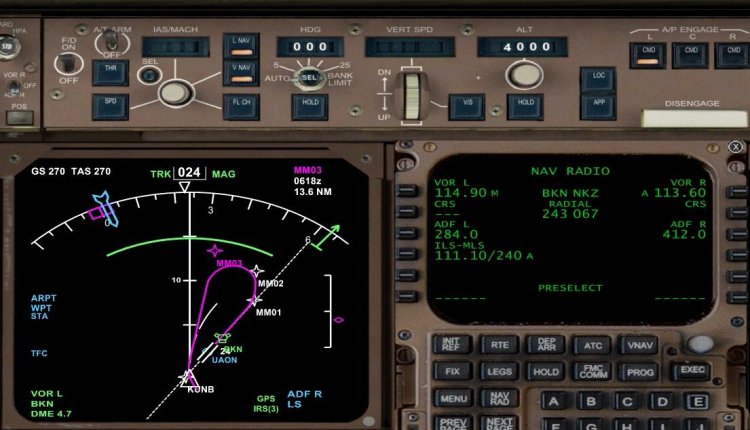
Дополнение данных аэропорта Юбилейный (Байконур/УАОН) в PMDG FMC.
Добавлены: аэропорт, ВПП06/24, ОПРС ВМ (Крайний), Стандартные схемы захода и выхода (неофициальные) SIDS/STARS.
Создано для помощи пользователям PMDG (иностранным коллегам) в рамках предстоящего флай-ина в IVAO посвященного "Международному дню полета человека в космос".
Добавлены: аэропорт, ВПП06/24, ОПРС ВМ (Крайний), Стандартные схемы захода и выхода (неофициальные) SIDS/STARS.
Создано для помощи пользователям PMDG (иностранным коллегам) в рамках предстоящего флай-ина в IVAO посвященного "Международному дню полета человека в космос".
→ Размер:
2 KB
→ Дата:
15 лет назад (02.04.2011 17:41)
→ Автор:
→ Разрешил модератор:
seric76
→ Лицензия:
Freeware - Бесплатная версия, распространение не ограничено
→ Скачан:
552 раза