Boeing 747-400 Саудовская аравия Просмотр ZIP-архива
texture.HZAIZ/readme.txt
Boeing 747-400 Saudi Arabian Airlines

This is a repaint of the Saudi Arabian Airlines default Boeing 747-400 for Microsoft Flight Simulator X.
Repainted by Azrin Jumat & Marwan Abdul latif.


Installation


To install:

1. Use Winzip to extract files into Microsoft Flight Simulator X\SimObjects\Airplanes\b747_400 directory.

2. Make sure “Use folder names” is ticked on the extract menu (see picture below), then click on “Extract”.

3. Open aircraft.cfg file found in the b747_400 directory using notepad and edit to include the following:

[fltsim.x]
title=Boeing 747-400 Saudi
sim=Boeing747-400
model=
panel=
sound=
texture=HZAIZ
kb_checklists=Boeing747-400_check
kb_reference=Boeing747-400_ref
atc_id=HZ-AIZ
atc_airline=Saudia
atc_flight_number=1123
atc_heavy=1
atc_parking_types=GATE
ui_manufacturer="Boeing"
ui_type="747-400"
ui_variation="Saudi Arabian Airlines"
ui_typerole="Commercial Airliner"
ui_createdby="Microsoft Corporation"
description="More than 30 years ago, the 747 made its first trip from New York to London.  Since then, it's become the standard by which other large passenger jets are judged. Its size, range, speed and capacity were then, and are now, the best in its class."


4. Rename the part at [fltsim.x] for x the values not the same as existing numbers used in aircraft.cfg.

5. Save aircraft.cfg file.


Credits

Repainted by Azrin Jumat
E-mail address: [email protected]

Advised & checked by Marwan Abdul Latif
of Jeddah, KSA
E-mail address: [email protected]
20497-texture.HZAIZ.zip
| Имя файла | Дата | Размер |
|---|---|---|
| texture.HZAIZ/ | 14.05.2009 22:24 | |
| texture.HZAIZ/b747saudi.jpg | 03.12.2006 23:15 | 122 KB |
| texture.HZAIZ/B747_1_T.dds | 03.12.2006 23:15 | 1 MB |
| texture.HZAIZ/B747_1_T_Specular.dds | 03.12.2006 23:15 | 1 MB |
| texture.HZAIZ/Fresnel_Ramp.dds | 03.12.2006 23:15 | 640 B |
| texture.HZAIZ/Fresnel_Ramp_1.dds | 03.12.2006 23:15 | 640 B |
| texture.HZAIZ/readme.pdf | 03.12.2006 23:15 | 399 KB |
| texture.HZAIZ/readme.txt | 03.12.2006 23:15 | 2 KB |
| texture.HZAIZ/Saudi747z.jpg | 03.12.2006 23:15 | 202 KB |
| texture.HZAIZ/texture.cfg | 03.12.2006 23:15 | 137 B |
| texture.HZAIZ/thumbnail.jpg | 03.12.2006 23:15 | 37 KB |
| avsim_su.diz | 15.05.2009 01:49 | 406 B |
| Итого: | 3 MB | |
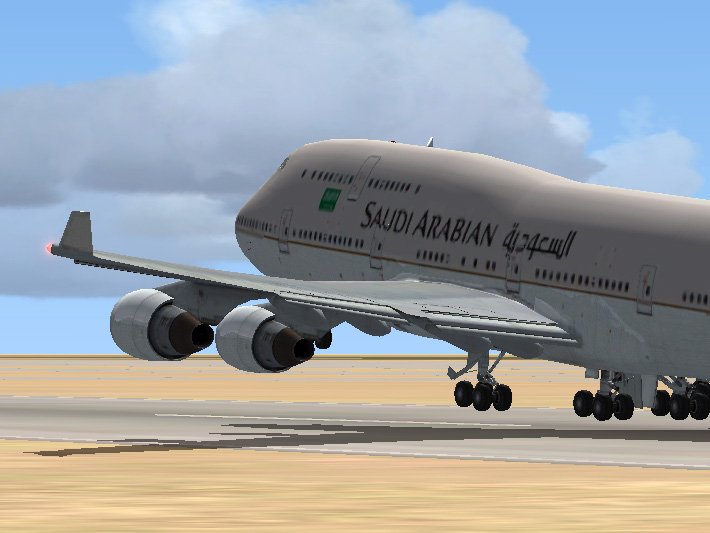
Текстура Boeing 747-400 Саудовская Аравия
→ Размер:
2 MB
→ Дата:
17 лет назад (14.05.2009 22:00)
→ Разрешил модератор:
AirArt
→ Лицензия:
Freeware - Бесплатная версия, распространение не ограничено
→ Скачан:
1117 раз