Ливрея для Боинга 737-800 АК Дельта Просмотр ZIP-архива
B737-800-delta/Read this.txt
Date 2 nov. 06

Thank you for downloading this my first BETA 1 attempt to
make a graphic livery in Delta Airlines design for the default B737_800 in FS X :-)

The texture file in the folder- (Texture.Delta) - In which the work has been done on is: b737_800_1_T.dds

Note. If you have other downloaded repaints in use of this aircraft. Read the other read me file!!


INSTALL
Before you install the graphic file (Texture.Delta) please notice that you should !!back-up!! your
entire present FS X B737_800 folder, just in case you wanґt to discard this livery and aircraft.cfg file you just downloaded.

If you havenґt already found  your way to
the aircraft folder in FS X, Follow the path''' to install
the Delta B737_800 replacement texture and aircraft.cfg file.


----------------------------------------------------------
INSTALL Delta B737_800 texture:

Unpack the downloaded zip folder and install the (Texture.Delta)
and replace the aircraft.cfg file with the one in your FS X B737_800 folder.

!!!! This will replace the B737_800 aircraft file cfg and extend it with
the b737-800 Delta Airlines texture version.

Path to your aircraafts in FS X is:'''
C:\Programs\Microsoft Games\Microsoft Flight Simulator X\SimObjects\Airplanes\B737_800


After install open FS X and choose the B737_800 Delta Airlines.
-Notice the new picture for the B737_800 Delta Airlines.

-------------------------------------------------------------

Kind regards.
Peter.

Please comment on this link
http://www.softwares.dk/cont.html
Itґs in the energy - and the birds know why.

Have Fun. - hope you like it

-----------

THANKS TO:
----------
-the developers of DDS Converter 2
where I was able to convert .dds files into PSD files and back.

Thanks to Microsoft Visual Basic 2005
where I was able to edit the aircraft.cfg with my new Livery information
(find it all on the web)
13401_B737-800-delta[1].zip
| Имя файла | Дата | Размер |
|---|---|---|
| B737-800-delta/aircraft.cfg | 24.10.2006 19:42 | 29 KB |
| B737-800-delta/b737ad_600.jpg | 24.10.2006 19:48 | 67 KB |
| B737-800-delta/pict.JPG | 24.10.2006 19:48 | 219 KB |
| B737-800-delta/pict2.JPG | 24.10.2006 19:48 | 222 KB |
| B737-800-delta/Read this if you have other repaints downloaded for this aircraft.txt | 03.11.2006 00:37 | 1 KB |
| B737-800-delta/Read this.txt | 03.11.2006 00:38 | 2 KB |
| B737-800-delta/Texture.Delta/ | 03.11.2006 00:33 | |
| B737-800-delta/Texture.Delta/b737_800_1_T.dds | 21.10.2006 22:20 | 1 MB |
| B737-800-delta/Texture.Delta/b737_800_1_T_Specular.dds | 21.10.2006 22:20 | 1 MB |
| B737-800-delta/Texture.Delta/b737_800_2_T.dds | 21.10.2006 22:20 | 1 MB |
| B737-800-delta/Texture.Delta/b737_800_2_T_Specular.dds | 21.10.2006 22:20 | 1 MB |
| B737-800-delta/Texture.Delta/Fresnel_Ramp.dds | 21.10.2006 22:20 | 640 B |
| B737-800-delta/Texture.Delta/texture.cfg | 21.10.2006 22:20 | 137 B |
| B737-800-delta/Texture.Delta/thumbnail.jpg | 21.10.2006 22:20 | 34 KB |
| avsim_ru.diz | 16.05.2008 22:08 | 415 B |
| Итого: | 6 MB | |
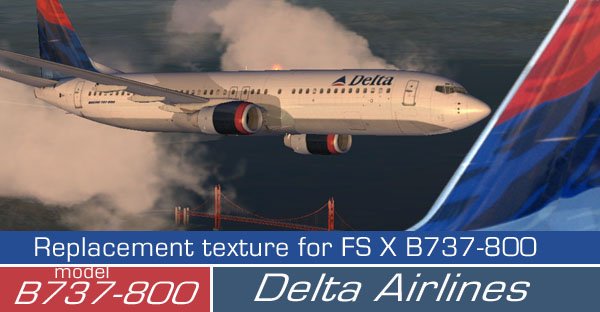
Ливрея для Боинга 737-800 АК Дельта
→ Размер:
4 MB
→ Дата:
18 лет назад (16.05.2008 18:08)
→ Автор:
www.softwares.dk
→ Лицензия:
Freeware - Бесплатная версия, распространение не ограничено
→ Скачан:
980 раз