Панель Bombardier Dash 8 Q400 для Microsoft Flight Simulator 2004. Просмотр ZIP-архива
Dash8Q400/Readme/Readme_First_Eng.htm
<!DOCTYPE HTML PUBLIC "-//W3C//DTD HTML 3.2//EN">
<html>
<head>
<meta name="GENERATOR" content="PageBreeze Free HTML Editor (http://www.pagebreeze.com)">
<meta http-equiv="Content-Type" content="text/html;charset=ISO-8859-1" >
<title>Readme First</title>
</head>
<body bgcolor="#ffffff">
<h1 align="left"><font face="Arial">Bombardier Dash 8 Q400 panel for
Microsoft Flight Simulator 2004</font> </h1>
<hr>
<h3 align="left"><font face="Arial">Created by Dmitry Stepin aka Bravo aka
Sterk</font>  </h3>
<hr>
<h4 align="left"><font face="Arial">Compatibility</font> </h4>
<p align="left"><font face="Arial">

      This panel has been
created for and tested under Microsoft Flight Simulator 2004. </font> </p>
<p align="left"><font face="Arial">

However,since it's fully XML-based,it may work also in MSFX,except
FSpassengers control panel and panel switches sounds, </font> </p>
<p align="left"><font face="Arial">


      because </font><font
face=Arial>these features use .gau files,designed for MSFS2004.</font> </p>
<p align="left"><font face="Arial">

  This
panel has been built especialy for <strong>Dreamwings Dash 8-400 model</strong>


  , </font> </p>
<p ><font face="Arial">although can be used with any other
model,</font> </p>
<p ><font face="Arial">but note that exits controls and wing
views are Dreamwings model's specific and may not work correctly with other
models.</font> </p>
<p>
<p>
<hr>

<p></p>
<h4><font face="Arial">Installation</font></h4>
<p><font face="Arial">Unzip the "Dash8Q400.zip" folder into temporary
location.</font></p>
<p><font face="Arial">Copy "panel"
folder into your \Aircraft\Dreamwings_Dash_8Q-400
folder</font></p>
<p><font face="Arial"><font color="#ff0000">BACK UP OR RENAME YOUR EXISTING "PANEL" FOLDER BEFORE OVERWRITING
IT!</font>Otherwise it will be replaced with this panel.</font></p>
<p><font face="Arial">Copy "Dash8_400" folder,wich contains panel
swithes sounds into Flight Simulator's "Sound" folder.</font></p>
<p><font face="Arial">Copy aircraft.cfg and DASH8Q400DS.air files into your
\Aircraft\Dreamwings_Dash_8Q-400 folder.Press "Yes" to overwrite.</font></p>
<p><font face="Arial" color="#ff0000">BACK UP OR RENAME YOUR EXISTING .CFG AND .AIR
FILES BEFORE OVERWRITING!</font></p>
<hr>

<p></p>
<h4><font face="Arial">Flight dynamics</font> </h4>
<p><font face="Arial">

The package includes modified Dreamwings Dash8-400's  aircarft.cfg and new .air
file.</font></p>
<p><font face="Arial">
     These files has been modified
to work correctly with the panel,because original Dreamwings' files
contain</font></p>
<p><font face="Arial">some incorrect data(weight,flaps positions and
other).</font></p>
<p>
<hr>

<p></p>
<h4><font face="Arial">FSPassengers control panel</font></h4>
<p><font face="Arial">This Dash 8 Q400 panel has built-in controls
for seven FSPassengers most important commands:</font></p>
<p><font face="Arial">Seatbelts switch.</font></p>
<p><font face="Arial">Minidisplay toggle switch</font></p>
<p><font face="Arial">Serve drinks,sandwiches and hot meal buttons</font></p>
<p><font face="Arial">Play music and movie buttons.</font></p>
<p><font face="Arial">The FSP control panel is based on "FsP Crew Panel"
(Copyright (c) 2007 Jan Wieck).</font></p>
<p><font face="Arial">According to terms of license agreement this package
contains full original version of "FsP Crew Panel".</font></p>
<p><font face="Arial">
    However you don't need all original
files for my panel to work.</font></p>
<p><font face="Arial">
FsP_LvarSupport.gau file is only required and it is already placed in
appropriate location,so there is no any</font></p>
<p><font face="Arial">"copypaste" actions needed to perform, unless you want
to install full original version(in that case see original readme inside "FsP
Crew Panel" folder).</font></p>
<p><font face="Arial">Decribed in "Installation" section is all you need to
do.</font></p>
<p><font face="Arial">
<hr>
<img style="Z-INDEX: 100; LEFT: 764px; POSITION: absolute; TOP: 1000px"
height=194 hspace=0 src="FSP_Panel.jpg" width=343 border=0></font>
<p></p>
<h4><font face="Arial">Radiopanel click spots</font></h4>
<p><font face="Arial">Radiopanel buttons have no labels,so
these buttons' assignments require explanation:</font></p>
<p><img height="422" hspace="0" src="Radiopanel.jpg" width="361"
border=0></p>
<p><font face="Arial">Changing frequencies is performed
directly on panel display by mouse left clicks or by mouse wheel.</font></p>
<hr>

<h4><font face="Arial">Credits</font></h4>
<p><font face="Arial">Panel artwork and gauges by Dmitry Stepin.</font></p>
<p><font face="Arial">FSPassengers controls are based on "FsP Crew Panel" by Jan
Wieck.</font></p>
<p><font face="Arial">Panel uses "dsd_xml_sound" gauge by Doug Dawson.</font></p>
<p><font face="Arial">Special thanks to Bill Leaming for his patience and help
with learning XML gauges building.</font></p>
<p>
<hr>

<p></p>
<p><font face="Arial"><strong>This panel is released as
freeware.</strong></font></p>
<p><font face="Arial"><strong>Gauges or panel modifying and
improving are welcomed.</strong></font></p>
<p><font face="Arial"><strong>Redistrubution original or modified panel and
gauges is allowed,but please give credit.</strong></font></p>
<hr>

<p><font face="Arial">Copyright © 2007 Dmitry Stepin.</font></p>
<p><font face="Arial">[email protected]</font></p>
<p> </p>
<p> </p>
<p> </p><font >
<p></font><font face="Times New Roman"> </font>
</p>
<p> </p>
<p> </p>
<p> </p>
<p align="left">  </p>
<p align="left">  </p>
<p> </p>
<p> </p>
<p> </p>
<p> </p>
<p> </p>
<p> </p>
<p> </p>
<p> </p>
<p> </p>
<p> </p>
<p> </p>
<p> </p>
<p> </p>
<p> </p>
<p> </p>
<p> </p>
<p> </p>
<p> </p>
<p> </p>
<p align="center"><font size="1">This Web Page Created with PageBreeze </font><a
href="http://www.pagebreeze.com" target="_blank"><font size="1">Free HTML
Editor</font></a></p>
</body>
</html>
11842_Dash8Q400.zip
| Имя файла | Дата | Размер |
|---|---|---|
| Dash8Q400/ | 02.01.2008 05:28 | |
| Dash8Q400/1446_FsP_CrewPanel-1.2/ | 29.12.2007 01:21 | |
| Dash8Q400/1446_FsP_CrewPanel-1.2/add_this_to_panel.cfg | 02.10.2007 22:51 | 1 KB |
| Dash8Q400/1446_FsP_CrewPanel-1.2/fsp_crew.bmp | 02.10.2007 20:42 | 130 KB |
| Dash8Q400/1446_FsP_CrewPanel-1.2/FsP_Crew.cab | 20.10.2007 17:24 | 8 KB |
| Dash8Q400/1446_FsP_CrewPanel-1.2/FsP_LvarSupport.gau | 20.10.2007 17:24 | 36 KB |
| Dash8Q400/1446_FsP_CrewPanel-1.2/license.rtf | 02.10.2007 20:42 | 11 KB |
| Dash8Q400/1446_FsP_CrewPanel-1.2/README.txt | 20.10.2007 17:20 | 3 KB |
| Dash8Q400/Aircraft.cfg | 29.12.2007 00:58 | 15 KB |
| Dash8Q400/DASH8Q400DS.air | 13.12.2007 06:14 | 15 KB |
| Dash8Q400/Dash8_400/ | 29.12.2007 00:49 | |
| Dash8Q400/Dash8_400/cabin_bell.wav | 23.07.2002 00:27 | 81 KB |
| Dash8Q400/Dash8_400/Dash8_Q400_sound.ini | 27.12.2007 19:07 | 6 KB |
| Dash8Q400/Dash8_400/recirc.wav | 18.04.2001 08:21 | 549 KB |
| Dash8Q400/Dash8_400/switch.wav | 10.01.2003 02:57 | 6 KB |
| Dash8Q400/Dash8_400/switch_soft.wav | 07.03.2005 08:40 | 551 B |
| Dash8Q400/Main_panel.jpg | 29.12.2007 01:40 | 65 KB |
| Dash8Q400/Main_panel_thumbnail.gif | 29.12.2007 01:35 | 13 KB |
| Dash8Q400/panel/ | 29.12.2007 00:52 | |
| Dash8Q400/panel/Annunciator.bmp | 28.12.2007 12:12 | 446 KB |
| Dash8Q400/panel/Dash8_400.cab | 29.12.2007 00:51 | 294 KB |
| Dash8Q400/panel/dsd_xml_sound3.gau | 16.01.2005 18:03 | 76 KB |
| Dash8Q400/panel/EICAS.bmp | 23.12.2007 04:19 | 754 KB |
| Dash8Q400/panel/Forward_Left.bmp | 14.11.2007 21:57 | 4 MB |
| Dash8Q400/panel/Forward_Right.bmp | 14.11.2007 22:29 | 4 MB |
| Dash8Q400/panel/FsP_LvarSupport.gau | 20.10.2007 17:24 | 36 KB |
| Dash8Q400/panel/Left.bmp | 14.11.2007 22:02 | 4 MB |
| Dash8Q400/panel/Main.bmp | 28.12.2007 14:02 | 4 MB |
| Dash8Q400/panel/Overhead.bmp | 25.12.2007 06:40 | 3 MB |
| Dash8Q400/panel/Panel.cfg | 28.12.2007 14:13 | 7 KB |
| Dash8Q400/panel/Radio_Panel.bmp | 23.11.2007 21:35 | 721 KB |
| Dash8Q400/panel/Rear.bmp | 21.10.2002 13:46 | 4 MB |
| Dash8Q400/panel/Rear_Left.bmp | 08.09.2006 05:47 | 769 KB |
| Dash8Q400/panel/Rear_Right.bmp | 08.09.2006 05:47 | 769 KB |
| Dash8Q400/panel/Right.bmp | 14.11.2007 23:18 | 4 MB |
| Dash8Q400/panel/Throttle_Quadrant.bmp | 22.11.2007 03:07 | 689 KB |
| Dash8Q400/panel/Thumbs.db | 29.12.2007 00:55 | 41 KB |
| Dash8Q400/Readme/ | 02.01.2008 05:29 | |
| Dash8Q400/Readme/FSP_Panel.jpg | 28.12.2007 22:41 | 24 KB |
| Dash8Q400/Readme/Radiopanel.jpg | 28.12.2007 23:01 | 31 KB |
| Dash8Q400/Readme/Readme_First_Eng.htm | 29.12.2007 01:10 | 6 KB |
| Dash8Q400/Readme/Readme_First_Russian.rtf | 02.01.2008 05:28 | 9 KB |
| Dash8Q400/Readme/Readme_First_Russian.txt | 02.01.2008 05:20 | 5 KB |
| Dash8Q400/Readme/Thumbs.db | 29.12.2007 00:52 | 14 KB |
| Итого: | 33 MB | |
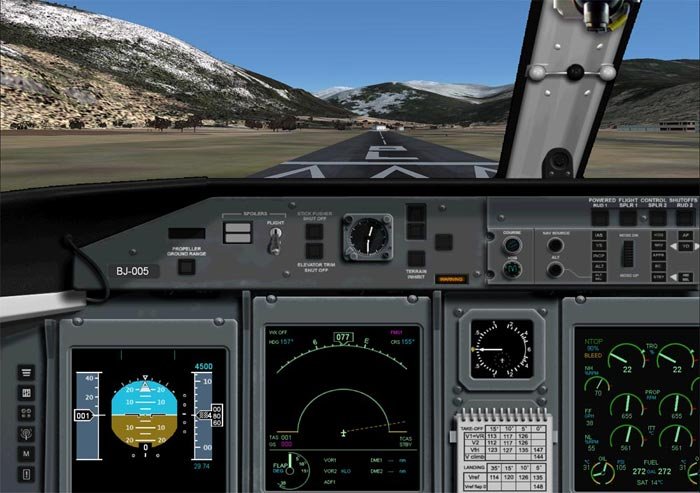
Моя "проба пера" в панелестроении.Сделана полностью на XML.Все битмапы и гауги кастомные.
Включает следующие панели:главную панель,оверхэд,EICAS с панелью управления шасси,блок управления двигателями,радиопанель с панелью управления триммированием,табло предупреждений.Боковые виды и виды на крыло(точнее на движки).В оверхэд встроена мини-панель управления для FSPassengers,стилизованная под "родной стиль" панели Dash-8 Q400.
Панель не "хардкорная"...Сразу предупреждаю.:)
Включает следующие панели:главную панель,оверхэд,EICAS с панелью управления шасси,блок управления двигателями,радиопанель с панелью управления триммированием,табло предупреждений.Боковые виды и виды на крыло(точнее на движки).В оверхэд встроена мини-панель управления для FSPassengers,стилизованная под "родной стиль" панели Dash-8 Q400.
Панель не "хардкорная"...Сразу предупреждаю.:)
→ Размер:
7 MB
→ Дата:
18 лет назад (02.01.2008 18:54)
→ Автор:
Дмитрий Степин ака Bravo
→ Лицензия:
Freeware - Бесплатная версия, распространение не ограничено
→ Скачан:
2754 раза